1. Home
  2. Features
  3. Records & medications
Records & medications

Your paperwork, read on your phone.

Scan or import lab reports and prescriptions, keep the originals, and add medication schedules with dose reminders, all stored on this device.

Coming soon to the App StoreComing soon to Google Play
Ayuvo health records
Ayuvo medications
Stays on your deviceNo Ayuvo account, no Ayuvo server.
You choose the AIBring your own key, or run a model on the phone.
No ads, no analyticsNothing is tracked, sold or profiled.
Open sourceMIT-licensed. Read every line.
Records

Scan it once. Find it forever.

Add lab reports, prescriptions, consultation notes, discharge summaries, imaging reports, bills and more from the camera, a file, a scan or the share sheet. Ayuvo saves the original untouched, reads the text on your phone and finds the doctor, facility, dates and test values.
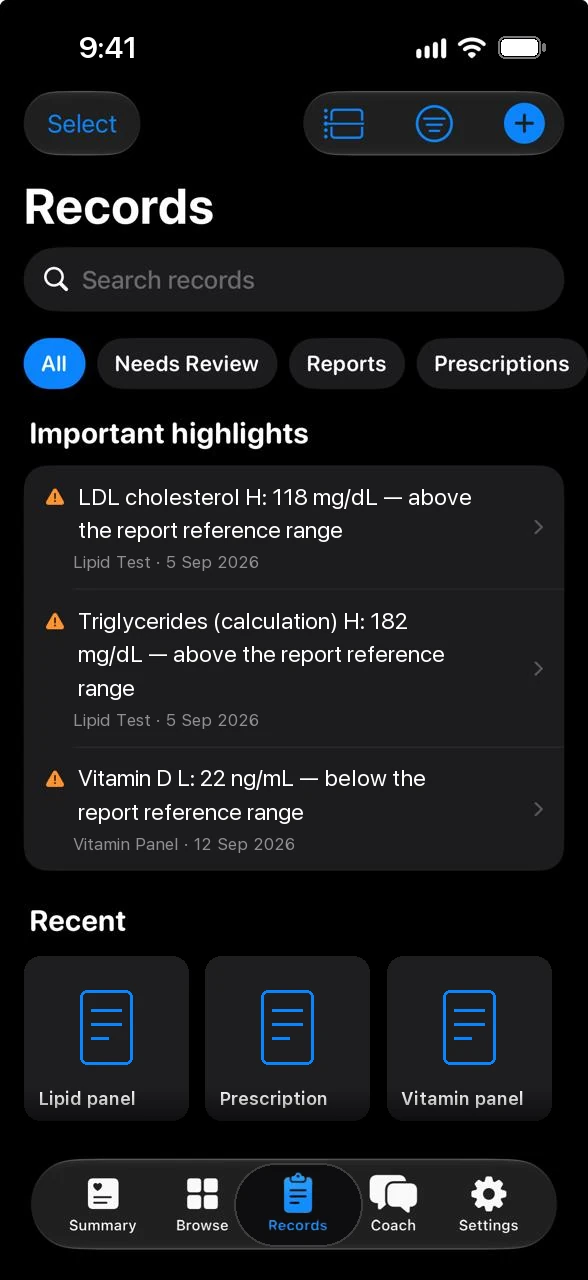
  • Twelve document types, a timeline, list and grid, and one search across titles, people, terms, page text, notes and tags
  • Results the report itself marks as low, high or abnormal show up as highlights, with the reference range the report printed
  • Trends join the same test across reports, and tapping a value opens the source page
Ayuvo health records with important highlights
Extraction

You confirm every value.

Extracted items are suggestions you can confirm, edit or reject. Ayuvo does not interpret your results. It shows what the document says, and labels anything an AI summarised so you can check it against the original.
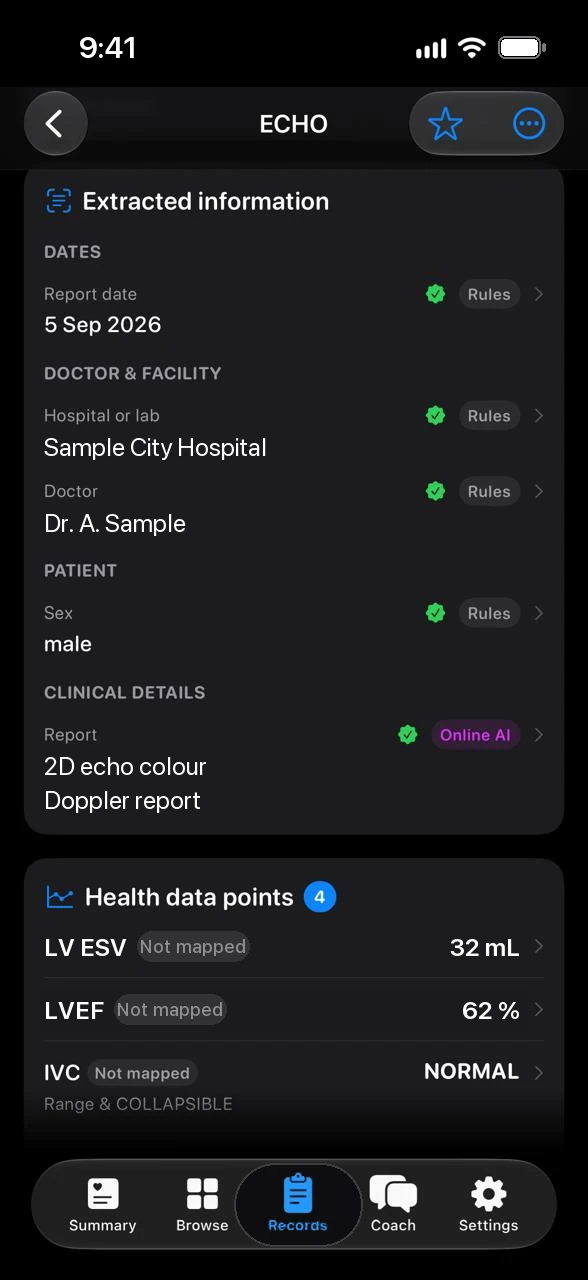
  • Rules run on your phone. AI helps only where they left a gap, and only if you allow it
  • Choose Local AI, Cloud AI on your own key, Ask me for each record, or Skip AI
  • Each record states whether it was processed on this device, with online AI, or not by AI
Ayuvo record detail with extracted information and health data points
Sharing

Share what you mean to, and nothing else.

Choose the records and pages, choose which details go in the summary, and black out name, address, phone number, patient ID and insurance ID. Redacted pages are shared as images so covered text cannot be recovered. You review every file before anything is sent.

  • The coach can read records only after a separate consent that is off by default
  • Patient name, address, phone and ID numbers are never included in what the coach receives
  • Records are never part of the regular cloud backup. Export them yourself in Export All Data
Ayuvo records screen
Medications

Reminders for the medicines you choose to add.

Add a medicine with its dose, form, food relation and schedule: daily times, weekdays, every few hours, or as needed. Ayuvo reminds you when a dose is due, and you mark it Taken, Skip or Snooze straight from the notification.
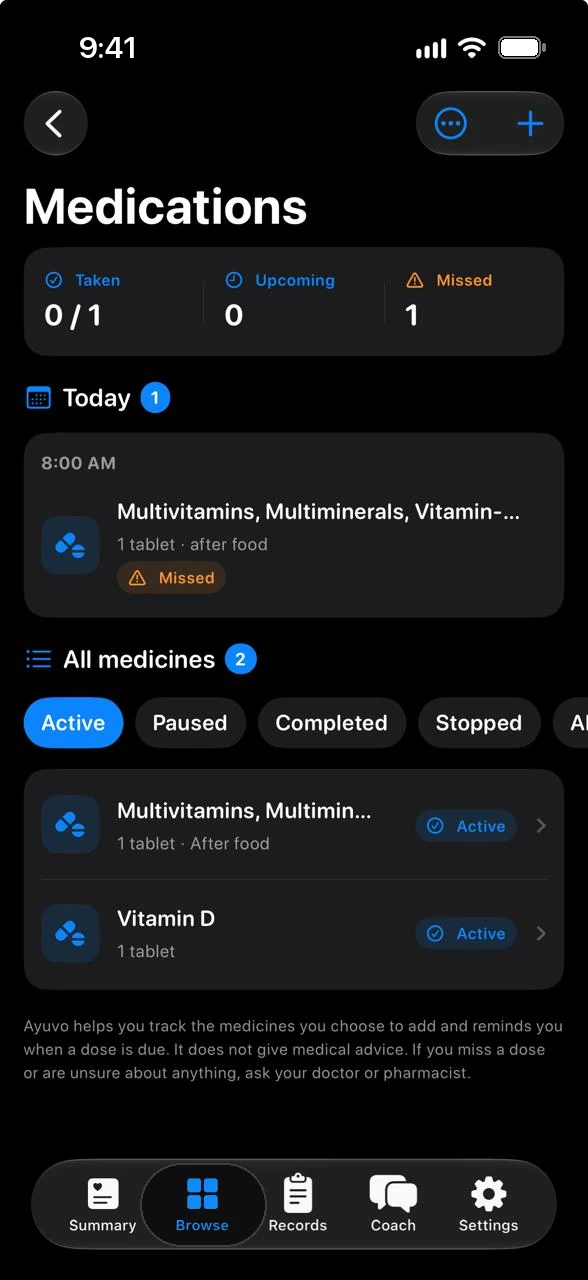
  • Statuses of Scheduled, Due, Taken, Skipped, Missed and Snoozed, and a rolling 7-day adherence figure
  • Adherence per medicine, where doses you chose to skip are left out, and a suggested reminder time when you usually take a dose more than an hour late
  • When a lab report shows low haemoglobin or another linked value, a card sets it beside your intake of the related nutrient and suggests talking to your doctor
  • Import a prescription from a record, then review every suggested medicine before it is created
  • Stored on this device, excluded from cloud backups, and included in Export All Data
Ayuvo medications with taken, upcoming and missed doses

Not medical advice. Ayuvo helps you track the medicines you choose to add and reminds you when a dose is due. It does not give medical advice. If you miss a dose or are unsure about anything, ask your doctor or pharmacist.

Privacy

What records and medications send, and to whom

Originals and medicines are stored on the phone. Some choices are yours to make.

Document reading

On-device text recognition and rules read each document on the phone. Skip AI and nothing is sent anywhere.

Cloud AI, if you choose it

With Cloud AI, text read from a document goes to the provider you chose, with your key. Pages without readable text may be sent as images.

Sharing and coach

A record leaves only when you share it, or when you ask the coach about it after turning the records consent on.

See every data flow

Compare

Weighing up your options?

Honest side-by-sides with the apps and services people use for records and health data, including where each one is stronger.

See all comparisons

FAQ

Questions about this feature.

Does Ayuvo interpret my results?

No. It shows what the document says and highlights values the report itself marks as outside its reference range. Talk to your clinician about what they mean.

Can Ayuvo tell me when to take a medicine?

It reminds you at the times you set. It never suggests a dose, and it never tells you to start, stop, change or skip a medicine.

Does the coach see my records or medications?

Only after you turn on the separate consent for each, and both are off by default.

Get started

Start with the whole picture.

Free, private, on your device. Bring your own AI key. No account, no subscription, no ads.

Coming soon to the App StoreComing soon to Google Play

Or read the code: Ayuvo is open source