iOS 17.6+ · Android 8.0+No account · No ads · No analyticsOpen source

Your health. Your device. Your call.

Ayuvo is a free, private health app for iPhone and Android. Nutrition, workouts, health records, medications, insights and your Apple Health or Health Connect data, together and kept on your phone. Ask an AI coach only if you want to, with a key you bring or a model that runs on the phone itself.

Coming soon to the App StoreComing soon to Google Play

Free for iPhone and Android. No account. Open source under the MIT licence.

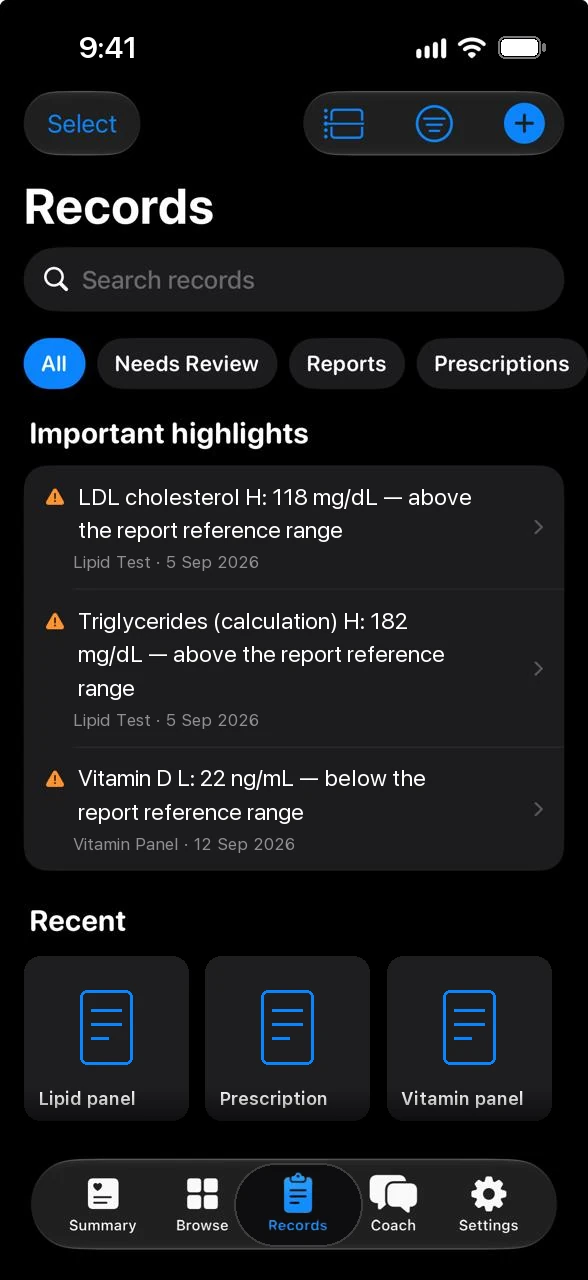
Ayuvo health records with important highlights
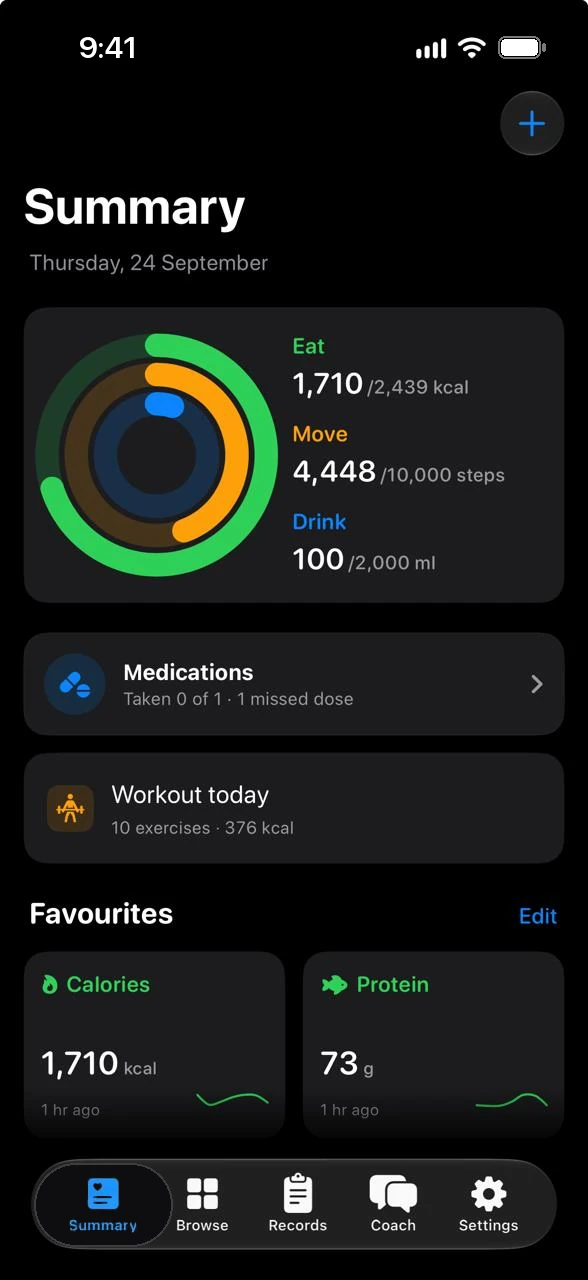
Ayuvo Summary with Eat, Move and Drink rings
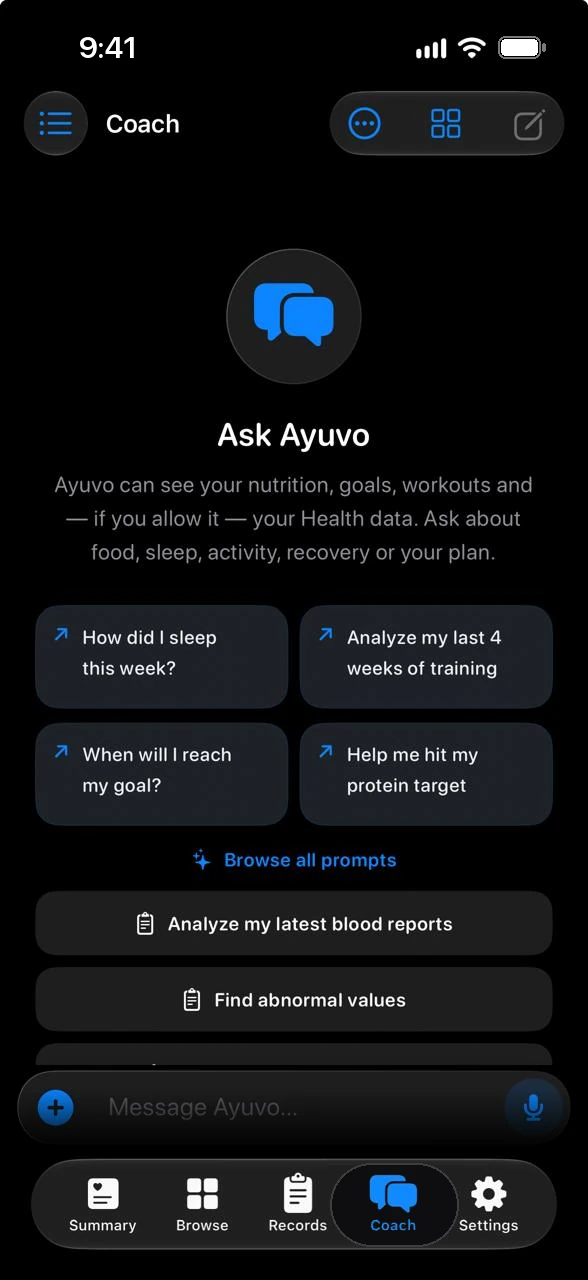
Ayuvo coach chat with suggested prompts
Stays on your deviceNo Ayuvo account, no Ayuvo server.
You choose the AIBring your own key, or run a model on the phone.
No ads, no analyticsNothing is tracked, sold or profiled.
Open sourceMIT-licensed. Read every line.
01 Everything in one place

One app for the whole picture.

The parts of your health that usually live in six apps, kept together on your phone, with an AI coach that can read across them only when you allow it.

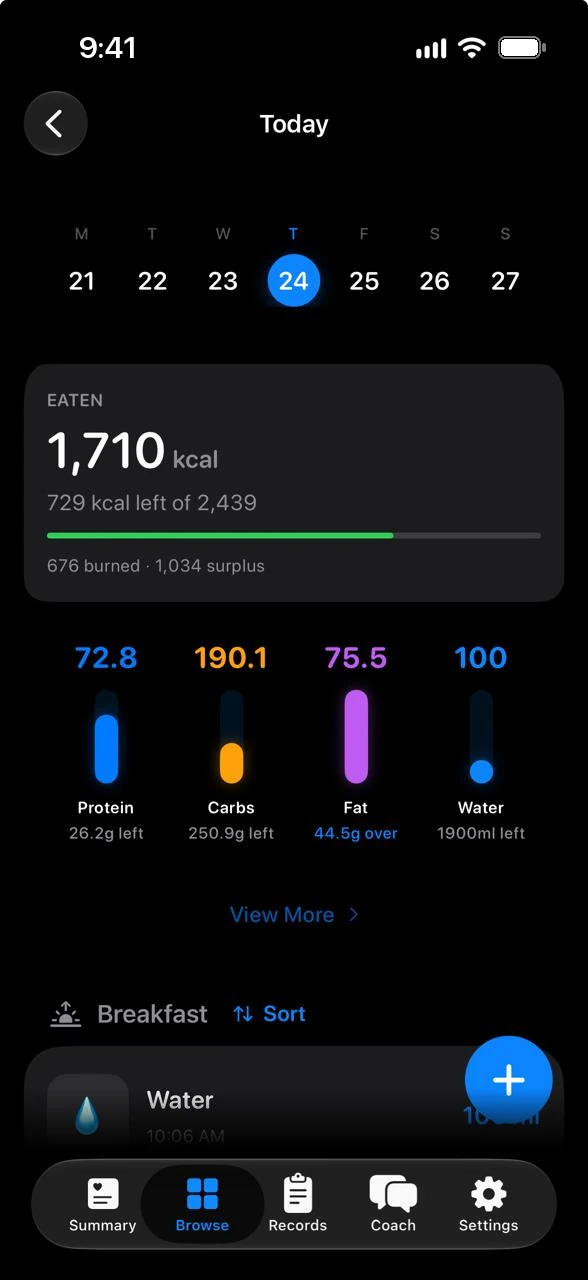
Nutrition

Snap it, scan it, say it.

Photos, barcodes, voice or text, reviewed before anything is saved.

Ayuvo daily nutrition diary with calories, macros and water
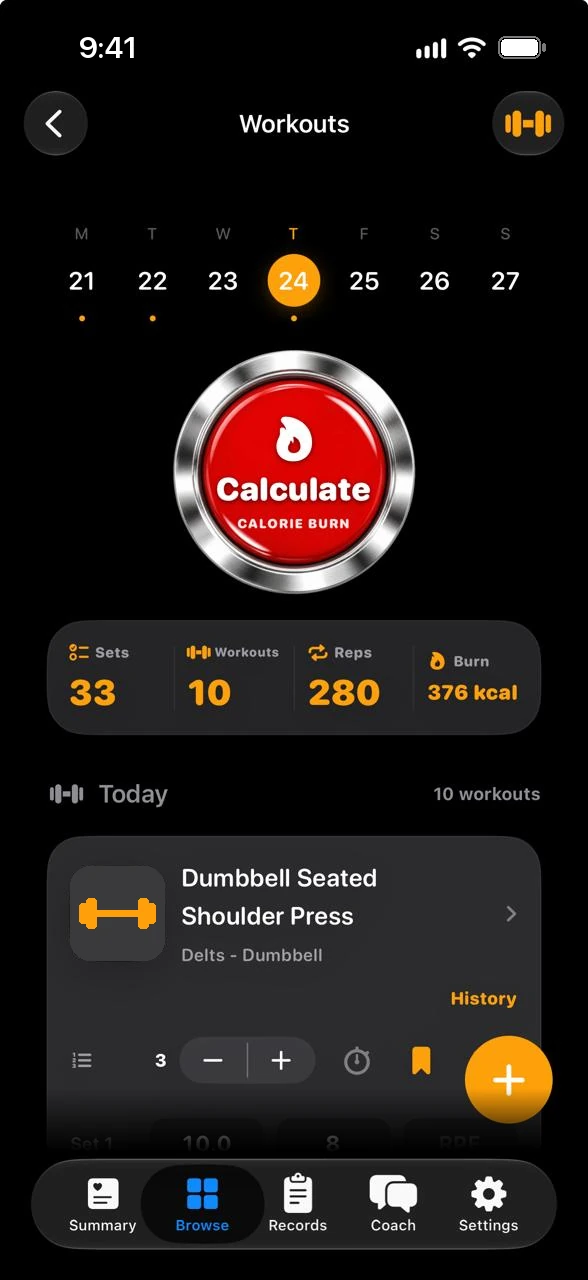
Workouts

Record the route. Log the set.

GPS walks, runs, rides and hikes with splits and a map, and strength sessions from a 1,300+ exercise library.

Ayuvo workout diary with calculated calorie burn
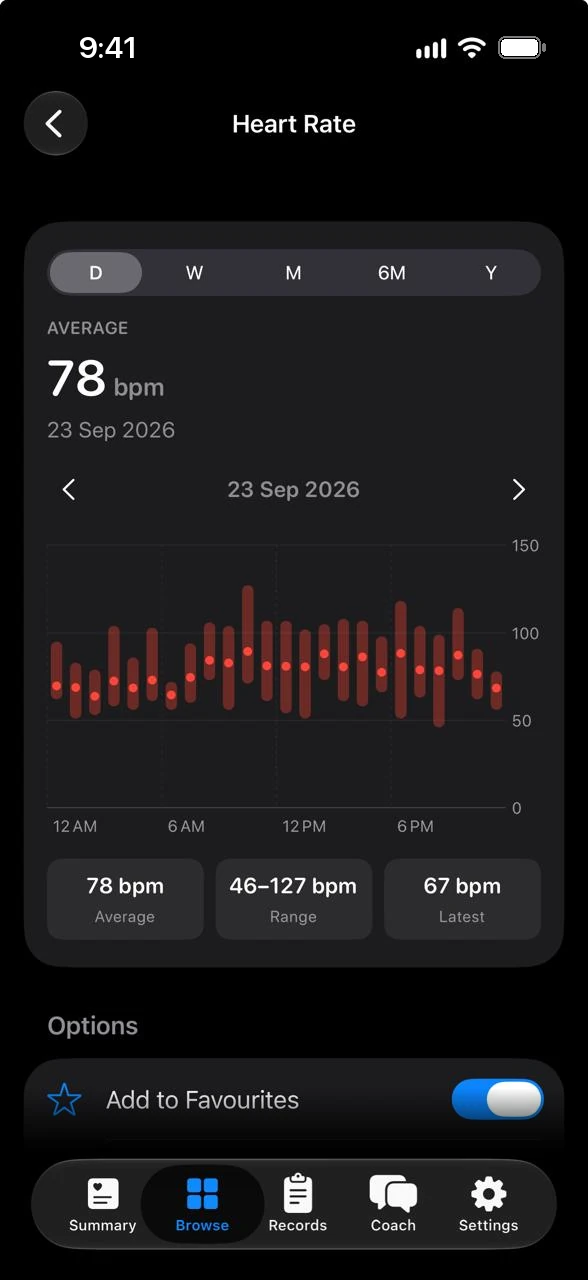
Health data

Every chart, one hub.

Apple Health and Health Connect, mirrored on your phone.

Ayuvo heart rate chart with day, week, month and year ranges
Records

Documents that read themselves.

Scan a report. Values and highlights appear, processed on your phone.

Ayuvo health records with important highlights
AI coach

Ask about your own day.

Consent for every data source, on your key or on your phone.

Ayuvo coach chat with suggested prompts
Fasting & water

Timers that stay optional.

Off by default. Goals, reminders and widgets when you want them.

Ayuvo Summary with Eat, Move and Drink rings
Insights

Your own baseline, not someone else's.

Morning Recovery, Ayuvo Health Age, a Daily Review, trends and patterns, calculated on your phone.

Derived metrics

Vitals your devices don't record.

Resting heart rate, zones, sleep regularity, cardio fitness and 56 more, estimated from your own data. A value from Health always wins.

GPS workouts

Walk, run, ride or hike.

Route, splits and elevation, with Pause, Lap and End on the Lock Screen, in a notification, on a widget or on Apple Watch.

Siri & Shortcuts

Ask Siri. Build a Shortcut.

47 actions for Siri, the Shortcuts app, Android shortcuts and links. No action can delete anything.

Switch phones

iPhone to Android, and back.

Export All Data on one phone, import it on the other. Your history moves with you.

On-device AI

Models that live on the phone.

Run Gemma, Qwen or a medical model on the phone itself. No key, no server, nothing to send.

Privacy

Private by design. Not as a setting.

There is no Ayuvo account and no Ayuvo server. Your food, workouts, health data, records and chats are stored in the app on your phone. Data leaves it only when you take an action, and only to a service you chose.

  • Health data, medications and records each need their own consent before the coach can read them
  • API keys live in the iOS Keychain or Android EncryptedSharedPreferences, never in a backup
  • No analytics, crash-reporting or advertising SDKs. This website sets no cookies
  • Open source, so the claims above can be checked

See every data flow

What can leave your phone, and only when you act
  • Photos, text and coach messages to the AI provider you configured
  • Audio to a speech provider, only if you pick a cloud one
  • A barcode number to Open Food Facts, when you scan
  • Exercise images and model files, as plain requests to GitHub and Hugging Face
  • Map images of the area shown, when you look at a workout route
  • A record or export, when you tap Share or Export
  • Your own Google Drive, if you turn on Android backup
0Ayuvo accounts or servers
0analytics, crash or ad SDKs
15AI providers on your own key
18languages
Health records & medications

Your paperwork, read on your phone.

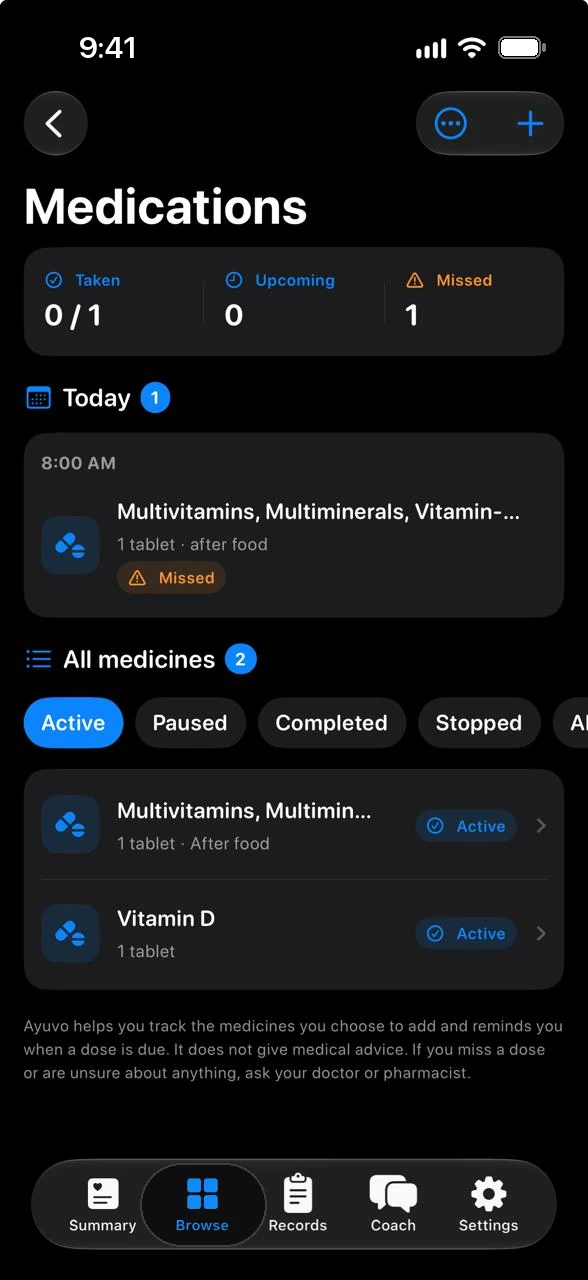
Add lab reports, prescriptions and visit notes from the camera, a file, or the share sheet. Ayuvo keeps the original, reads the text on your phone and pulls out the doctor, dates and test values. Results the report itself marks as outside its range are highlighted. Medications get schedules and dose reminders.

  • You choose how AI helps: on this device, your own provider, ask each time, or not at all
  • Every record says whether it was processed on this device, online, or not by AI
  • Share pages with name, address and ID numbers blacked out
  • Medication reminders with Taken, Skip and Snooze right from the notification

See records and medications

Ayuvo health records list with highlights
Ayuvo medications with today's doses
On-device AI

Run a health model on the phone itself.

Download Gemma, Qwen or MedGemma once and ask questions with no key, no server and nothing to send. MedGemma is Google's open model family for medical text and images. Ayuvo offers MedGemma 1.5 4B, a 2.82 GiB download for phones with 8 GB of memory or more.

  • Gated download: accept Google's terms on Hugging Face, then add a free access token
  • Text and image understanding, in a 2,048-token context window
  • A research model, not a medical device. It never replaces your clinician

See the on-device models

On-device modelsSize · memory
Gemma 4 E2B2.41 GiB · 8 GB RAMtext + images · 4,096-token context · Apache-2.0
Qwen3 1.7B0.91 GiB · 6 GB RAMtext · 4,096-token context · Apache-2.0
Qwen3 4B2.48 GiB · 8 GB RAMtext · 4,096-token context · Apache-2.0
Qwen3 8B4.55 GiB · 12 GB RAMtext · 4,096-token context · Apache-2.0
Qwen3 14B8.06 GiB · 20 GB RAMtext · 4,096-token context · Apache-2.0
MedGemma 1.5 4B2.82 GiB · 8 GB RAMtext + images · 2,048-token context · Health AI Developer Foundations terms

Not a medical device. MedGemma is a research model released under Google's Health AI Developer Foundations terms. Its output is preliminary, can be inaccurate and needs independent verification: it is not intended to inform clinical diagnosis, patient management decisions or treatment recommendations. Coach keeps its own rules whichever model answers. It describes, never diagnoses, never suggests starting, stopping or changing a dose, and defers to your prescriber.

MedGemma and Gemma are trademarks of Google. Ayuvo is an independent app and is not affiliated with or endorsed by Google.

Works with

Apple Health and Health Connect, mirrored locally.

With your permission Ayuvo keeps a local copy of the Health data you grant, then shows day, week, month, six-month and year charts, sources and units for every metric. It writes back only what you log or record: nutrition, body measurements, workouts and GPS routes. Where your devices leave a gap, Ayuvo estimates vitals such as resting heart rate from the data you already have, and a value from Health always wins.

Works with Apple HealthiPhoneWorks with Health ConnectAndroid
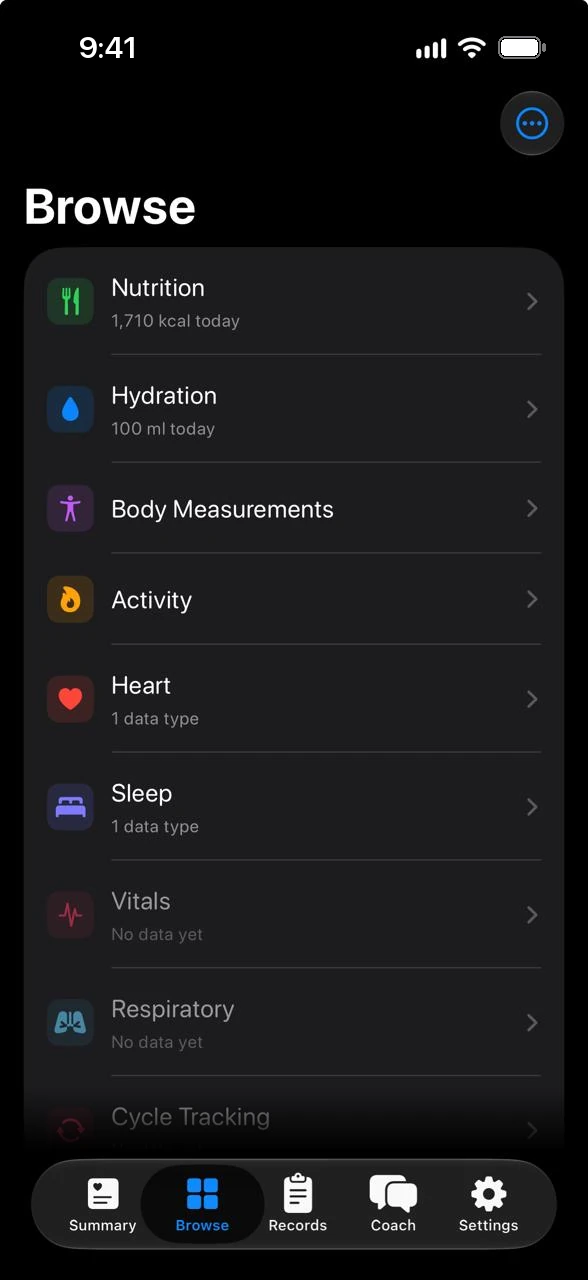
  • 13 categories, from activity and sleep to cycle tracking and vitals
  • Pin up to 12 favourites to Summary, with 7-day sparklines
  • 60 derived metrics, each with its method and source, and each one can be switched off
  • Your Health data is never in a cloud backup

See the Health data hub

Ayuvo Browse list of health categories
Ayuvo heart rate detail chart
Switch phones

Change phones. Or platforms.

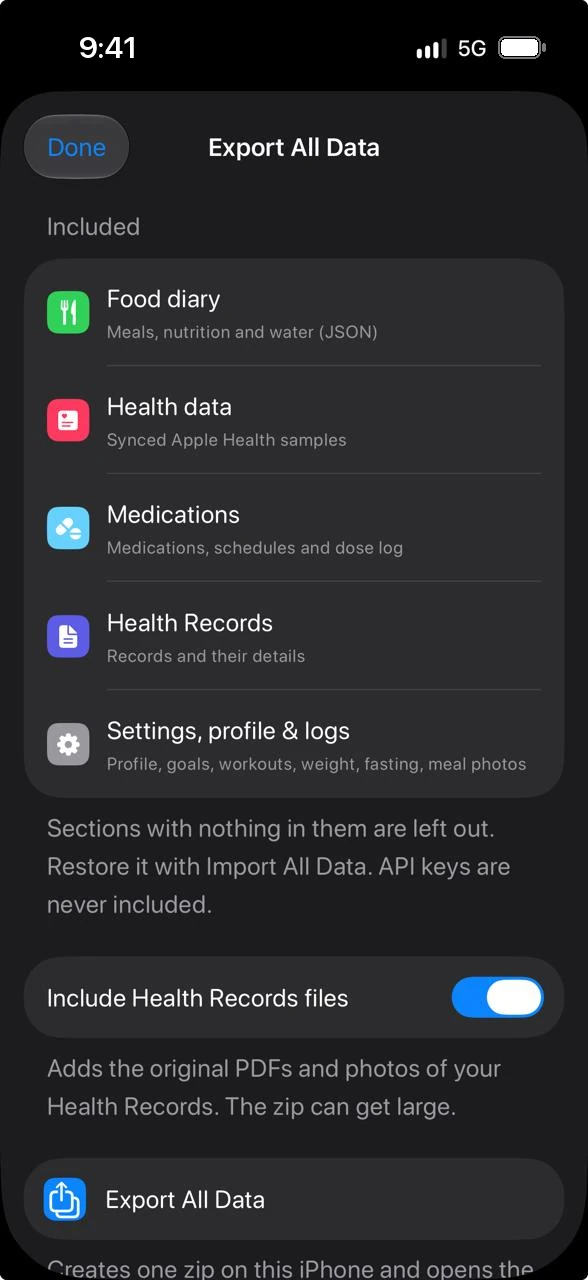
Export All Data creates one zip. Import it on an iPhone or an Android phone, or choose Restore from a backup while setting Ayuvo up, and your profile, goals, logs, workouts, medications, records and chats are back.

  • Merge, never overwrite: importing twice adds nothing, and nothing is deleted
  • API keys are never exported. You add them again on the new phone
  • An open, documented format you can inspect

See what moves and what stays

Ayuvo Export All Data sheet listing food diary, health data, medications, records and settings
Open source

Read it. Build it. Make it better.

Ayuvo is MIT-licensed, with the iPhone app in SwiftUI, the Android app in Jetpack Compose and shared contracts between them. Developers can contribute code, exercises, translations and docs. The project is inspired by an earlier open-source app, and its licence notice travels with it.

How to contribute

View on GitHubastechtic/ayuvo
Compare

Weighing up your options?

Honest side-by-sides with the apps and services people use for records and health data, including where each one is stronger.

See all comparisons

02 How it works

From capture to coaching in seconds.

Step 01

Capture

Snap up to 10 photos, scan a barcode, speak, type, or scan a document. Log a set, a glass of water, a dose or start a fast from the same + menu.

Step 02

Review

Your chosen provider, or a model on your phone, reads the photo or document. Correct anything before it is saved.

Step 03

Keep

Saved on your device. Nutrition, weight and calculated burn go to Apple Health or Health Connect only if you enable it.

Step 04

Ask Ayuvo

The coach pulls the slice of your data it needs, from the sources you allowed, and answers in context.

03 FAQ

Ayuvo, plainly answered.

Is Ayuvo free?

Yes. There are no subscriptions, credits or in-app purchases. AI features use an API key you create with a provider (many have free tiers); any usage is billed by that provider, never by Ayuvo. On-device models cost nothing to run after the download.

Which AI can I use?

Google Gemini, OpenAI, Anthropic, xAI, OpenRouter, Together AI, Groq, Hugging Face, Fireworks AI, DeepInfra, Mistral, DeepSeek, Cerebras, Ollama or any OpenAI-compatible endpoint. On supported phones, on-device models such as Gemma 4 E2B and MedGemma 1.5 4B run on the phone after a one-time download; iPhones can also use Apple Intelligence.

Where is my data?

In the app's storage on your phone. Ayuvo has no account and no server. Data leaves the device only when you act: sending a photo or message to your AI provider, scanning a barcode, browsing exercise images, downloading a model, sharing a record, exporting, or turning on Android's Google Drive backup.

What does the Health data hub do with Apple Health or Health Connect?

With your permission it keeps a local mirror of the data types you grant so Ayuvo can show charts and history. It writes only what you log or record in Ayuvo: nutrition, body measurements, workouts with their calories, and the route of a GPS workout. Values Ayuvo estimates are never written. You can revoke access any time in Health or Health Connect settings.

Can Ayuvo estimate vitals my watch or band doesn't record?

Yes. From data you already have, such as minute-by-minute heart rate, sleep and steps, Ayuvo estimates up to 60 metrics, including resting heart rate, heart rate zones, sleep regularity and cardio fitness, with published formulas. When Apple Health or Health Connect already has a value for that day, that value is shown instead. Each metric can be switched off. See every metric and its method.

Does Ayuvo track my location?

Only while you record a GPS walk, run, ride or hike. The route is stored on your phone and written to Apple Health or Health Connect with the workout. Ayuvo asks only for location while in use; on iPhone it keeps recording with the screen locked, with the location indicator showing. See GPS workouts.

Does the coach see my health data?

Only if you allow it. Health data, medications and health records each have their own consent, and medications and records are off by default. When a source is on, the coach can request summaries of it and sends them to the AI provider you chose, or to an on-device model that keeps them on the phone.

What are Recovery and Ayuvo Health Age?

Insights that Ayuvo calculates on your phone from your own synced data. Recovery is a 0 to 100 morning score comparing last night with your personal baselines. Ayuvo Health Age is Ayuvo's own estimate from fitness and habit markers, not a clinical or biological age. See how they are calculated.

Does Ayuvo work with Siri, Shortcuts and Android assistants?

Yes. On iPhone you can ask Siri, or build Shortcuts from 47 Ayuvo actions such as Get Nutrient, Log Water and Get Recovery. On Android there are launcher shortcuts and ayuvo:// links, and assistant capabilities are declared for Google Assistant and Gemini. See what works where.

Can I move from iPhone to Android, or back?

Yes. Export All Data on one phone creates a zip that Ayuvo on the other platform imports, during setup (Restore from a backup) or later. Your profile, goals, units, logs, workouts, health data, medications, health records and coach chats come along. API keys, reminder schedules and your AI provider choice deliberately do not.

What is MedGemma, and is it medical advice?

MedGemma is Google's open model family for medical text and images. Ayuvo offers MedGemma 1.5 4B as an optional on-device model: after a one-time gated download from Hugging Face it runs on the phone. It is a research model, not a medical device. Its answers can be wrong, and Ayuvo never diagnoses or advises on doses.

How do backups work?

Export All Data creates a zip on either platform that you save wherever you choose. Android can also back up to your own Google Drive app folder, off by default. Health data and medications are never in that Drive backup.

Can I export or delete everything?

Yes. Export All Data covers your diary, health data, medications, health records and settings, and API keys are never included. Settings, Delete All Data wipes the app's local storage; Health and Health Connect samples are left untouched by design.

Which languages does Ayuvo support?

18: English, Arabic, Azerbaijani, Czech, Dutch, French, German, Hindi, Italian, Japanese, Korean, Polish, Portuguese (Brazil), Romanian, Russian, Simplified Chinese, Spanish and Ukrainian.

Is it medical advice?

No. Ayuvo is not a medical device. Estimates come from AI and formulas; talk to a clinician before changing diet, training or medication.

Get started

Start with the whole picture.

Free, private, on your device. Bring your own AI key. No account, no subscription, no ads.

Coming soon to the App StoreComing soon to Google Play

Or read the code: Ayuvo is open source