Can I move from iPhone to Android?
Yes. Export All Data on the iPhone, then use Restore from a backup during setup or Import All Data on the Android phone. It works the other way too.
Export All Data bundles your diary, health data, medications, health records, coach chats, settings and logs. Ayuvo on the other platform reads it, because the cross-platform part of the zip is written in one normalised format that both apps produce and read.
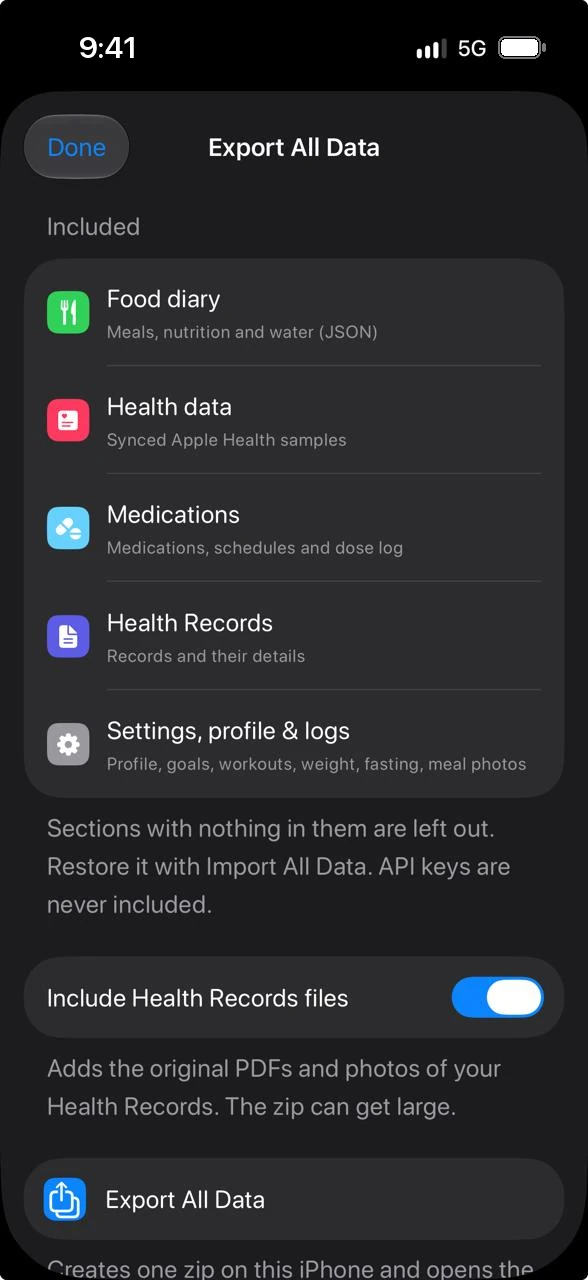
On the old phone, open Settings, Data & Privacy, Backup & Export and choose Export All Data. Ayuvo builds one zip.
Send the zip to the new phone any way you like: AirDrop, a cable, a cloud drive you already use, or a message to yourself.
On the new phone choose Restore from a backup while setting Ayuvo up, or use Import All Data later. Then add your AI key and grant Health access.
Some things should not travel. Keys, schedules and layouts differ between phones, so they are left out and you set them again in a minute.
| Comes along | Stays behind on purpose |
|---|---|
| Profile, goals and calorie and macro targets | API keys |
| Units and shared preferences | Notification switches and reminder times |
| Weights, body fat, measurements and fasting sessions | Your AI provider and model choice |
| Workouts, plans and saved exercises | Add-menu and quick-action layouts, and widgets |
| Food diary and water | Meal and exercise photos |
| Health data, medications, health records and coach chats | Onboarding state and Health sync switches |
There is no Ayuvo cloud in the middle. The file goes where you put it.
Export All Data writes a zip to the place you choose. It leaves the phone only when you move it.
API keys are never included, so the zip does not carry your provider access.
Android's optional Drive backup is a same-platform backup. Use the zip to change platforms.
Yes. Export All Data on the iPhone, then use Restore from a backup during setup or Import All Data on the Android phone. It works the other way too.
Nothing is duplicated. Existing entries are matched, new ones are added, and nothing is deleted.
Yes. Keys are never exported. Add your key on the new phone, or download an on-device model.
Free, private, on your device. Bring your own AI key. No account, no subscription, no ads.
Or read the code: Ayuvo is open source