- Home
- Private by design
Your health. Your device. Your call.
Ayuvo is built so your health data stays where you keep it: on your phone. No account, no server, no ads, no analytics. Here is exactly what is stored, what can leave, and when.
Four promises, each one checkable.
On this device
Your profile, diary, workouts, health data, records, medications and coach chats are stored in the app on your phone. Ayuvo has no account and no server, so there is nothing of yours to breach on our side.
You pick every destination
Data leaves only when you act, and only to a service you chose: your AI provider, a barcode database, a file host or your own drive. Choose an on-device model and the AI step stays on the phone too.
Visible, per source
Health data, medications and records each have their own switch before the coach can read them. Medications and records start off. You can turn a source off between messages.
Open to inspection
No analytics, crash-reporting or advertising SDKs, and no first-party endpoints. The code is open source so you can check it. This website sets no cookies and loads nothing from third parties.
What can leave your phone, and when.
Ayuvo makes no network request on its own behalf. Each flow below happens because you triggered it, and it goes from your phone to the service named.
| Flow | What is sent | To | When |
|---|---|---|---|
| AI provider (your key) | Photos, text, coach messages and the context you ask for. Health data, medications and records only with their switches on | The provider you configured | When you analyse or ask |
| Explain with AI (Insights) | Derived scores, labels and review items only: no raw readings, dates or names | The provider you configured, or an on-device model | When you tap Explain with AI |
| On-device model | Nothing | Stays on the phone | Always |
| Derived metrics | Nothing. Estimates are calculated on the phone and never written to Health | Stays on the phone | Always |
| GPS workout | The workout and its route | Apple Health or Health Connect, on the phone | When you finish a GPS workout |
| Route map | Requests for map images of the area shown, not your route | Apple Maps (iPhone) or OpenStreetMap (Android) | When a route map is on screen |
| Siri, Shortcuts, Android shortcuts | Ayuvo adds nothing, except Log Food with a description, which goes to your AI provider after you confirm. Voice requests are handled by Siri or your Android assistant under their own settings | The provider you configured | When you run that action |
| Speech to text | An audio clip, only for a cloud provider | The provider you chose | Voice input, if you picked a cloud provider |
| Barcode | The barcode number | Open Food Facts | When you scan |
| Exercise images | A plain image request | GitHub (raw.githubusercontent.com) | When you browse the library |
| Model download | A plain file request, plus your access token for gated models | Hugging Face | When you tap Download |
| Sharing a record | The pages and details you choose | The app you pick | When you tap Share |
| Export All Data | A zip file | Where you save it | When you tap Export |
| Google Drive backup (Android) | The app backup archive, never health data or medications | Your own Drive app folder | If you turn it on |
This is a summary. The full Privacy Policy is the authority.
Two ways to keep even the AI step yours.
Bring your own key and requests go straight from your phone to the provider you trust, with no Ayuvo server in between. Or run a model on the phone, including MedGemma 1.5 4B, and the conversation never goes anywhere.
- 15 providers, keys kept in the iOS Keychain or Android EncryptedSharedPreferences
- Gemma 4, Qwen3 and MedGemma on the device, and Apple Intelligence on supported iPhones
Not a medical device. MedGemma is a research model released under Google's Health AI Developer Foundations terms. Its output is preliminary, can be inaccurate and needs independent verification: it is not intended to inform clinical diagnosis, patient management decisions or treatment recommendations. Coach keeps its own rules whichever model answers. It describes, never diagnoses, never suggests starting, stopping or changing a dose, and defers to your prescriber.
MedGemma and Gemma are trademarks of Google. Ayuvo is an independent app and is not affiliated with or endorsed by Google.
Export it, move it, delete it.
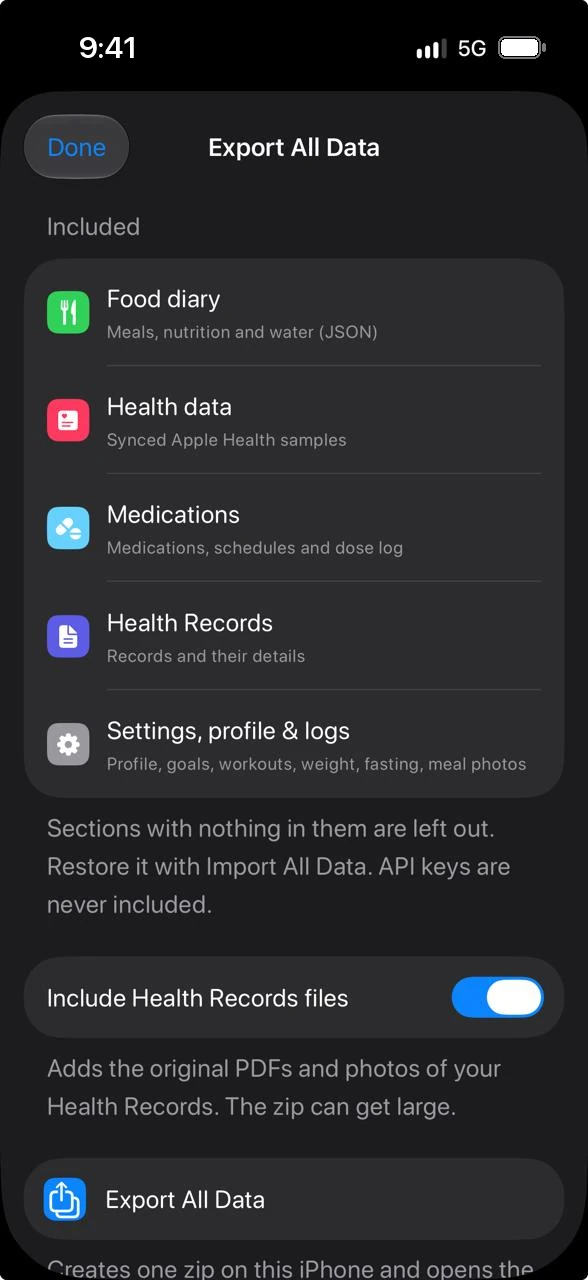
Export All Data gives you one zip you can read, keep and import on iPhone or Android. Delete All Data wipes the app's storage on the device. API keys are never in an export.
- Revoke Apple Health or Health Connect access at any time
- Health data, medications and records are excluded from cloud backups
Private, on purpose.
Free, private, on your device. Bring your own AI key. No account, no subscription, no ads.
Or read the code: Ayuvo is open source